1. It counts the gaps first
Altfield reads the catalogue and tells you what is missing before it writes anything or charges anything. Drafts, archived products and gift cards are left out: they have no storefront page for a search engine to index.

2. You pick the fields
Each field is generated and applied on its own, and unticked fields are never sent to the model — so a narrower run is a cheaper one. Product name is off here, as it is by default.

3. You read what it proposes
One row per product, each proposal beside the product it belongs to. Where the model is not confident, the row is labelled and left unticked, so the fields it is least sure about are the ones you cannot apply by accident.
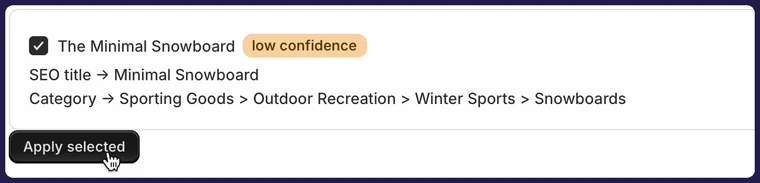
| Product | The Minimal Snowboard |
|---|---|
| Confidence | Low — flagged, and not pre-selected |
| SEO title | Minimal Snowboard |
| Product category | Sporting Goods > Outdoor Recreation > Winter Sports > Snowboards |
| Written when | Only after Apply selected is pressed, and only for the ticked rows |
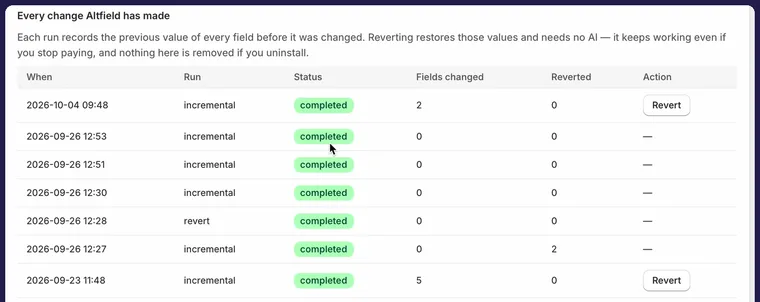
4. Every run stays undoable
The previous value of each field is recorded before it is replaced. Reverting restores those exact values, makes no AI calls, and is free on every plan — including after you stop paying.
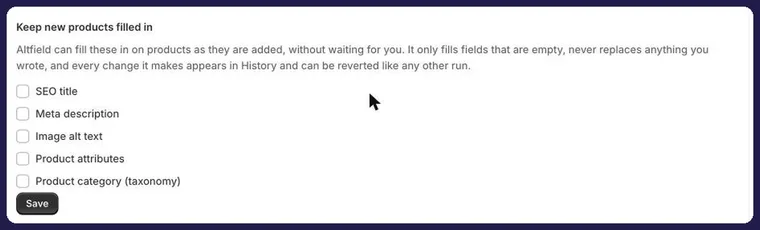
5. New products keep themselves filled in
Autopilot fills a product as you add it, so the catalogue stops drifting back out of date. It is off by default, chosen one field at a time, it only ever fills fields that are empty, and everything it writes reverts like any other run.